A $1500 Herman Miller Aeron chair and a $150 Kinesis split keyboard occupy the same ergonomic category, but desk workers chase the chair for RSI relief first. Wrists know better.
We're pushing back on the chair-first assumption because we know typing causes ulnar deviation eight hours daily while lumbar ignores pronation. The three picks below reset hand posture where Aeron's back support cannot reach.
The chair delivers comfort without prevention. Posture lives in the keyboard.
What the Aeron premium actually buys
Long-term reviews reveal the pattern across ergonomics. The Aeron's PostureFit sacral pad and tilt limiter set spine curve and recline tension precisely, while fully adjustable arms slide in depth, pivot outward, and match heights from 6.8 to 10.8 inches. Kinesis Freestyle2 splits modules 9 inches with 15-degree tenting and palm rests to unload wrists. The Advantage2 contours key wells using Cherry Silent Red switches with light actuation force.
That gap narrows at the workstation because Aeron handles dynamic sitting over long hours, whereas keyboards correct hand position with every keystroke across thousands daily.
Aeron buys three things primarily:
-
Spine mapping through PostureFit pads that flex to sacral curve and reduce slouch during static postures.
-
Recline control where the tilt limiter locks three posture angles and a tension dial matches body weight exactly.
-
Frame endurance from recycled materials that pivot arms without wobble through a decade of use.
Those features address back strain reliably. For wrists, split geometry matters more.
The $150 split that neutralizes forearms
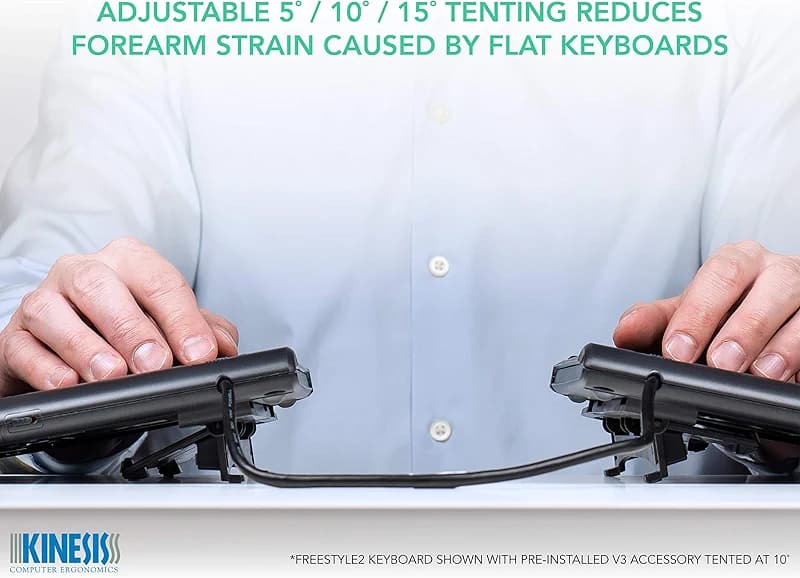
KINESIS Freestyle2 USB-A Ergonomic Keyboard w/ VIP3 Lifters for PC (9"
$144.00on Amazon
The Kinesis Freestyle2 lets users separate modules up to 9 inches for shoulder-width splay, while VIP3 tenting at 5 to 15 degrees positions elbows above the keyboard plane. Cushioned palm supports unload wrists completely, and low-force membrane switches reduce finger impact during extended sessions.
A standard layout with embedded numpad requires no retraining, and the pivot tether adjusts splay dynamically without tools.
It offers no mechanical feedback, which is the only style trade-off for saving $1350 over Aeron.
Developers at 60 words per minute find the split cuts pronation that chairs overlook entirely. Pair it with a standing desk at 28 inches high; Aeron accommodates the height but leaves hands pronated flat.
The contoured mechanical for thumb home row
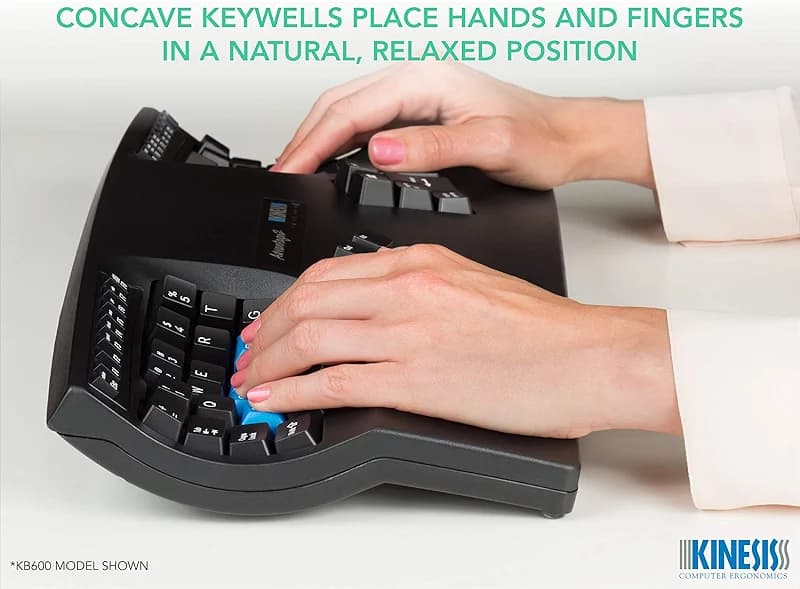
Kinesis Advantage2 arranges keys in concave split wells with an orthogonal layout that aligns thumb home keys vertically for natural reach. Cherry MX Silent Red linear switches provide light actuation and quiet operation suitable for shared offices, complemented by 20-degree fixed tenting and integrated palm rests.
Onboard flash enables programming for macros, remapping, and mode switching that persists across machines, while Cherry ML switches handle the function row smoothly.
Wireless absence favors wired USB reliability over battery concerns.
Orthogonal thumb arcs minimize reach strain, and contoured wells cradle fingers precisely where Aeron's seat adjustments fall short on keystroke paths. Desk workers handling calls appreciate the quiet linears most.
The $1500 chair when back trumps wrists
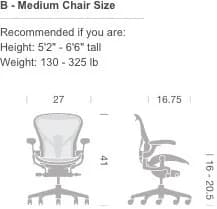
Herman Miller Aeron in Size B employs adjustable PostureFit pads with independent sacral and lumbar flex to map the spine curve accurately. The tilt limiter defines recline postures precisely, seat angle shifts forward for engaged positions, and arms adjust from 6.8 to 10.8 inches in height with 2.5-inch depth slide plus 15-degree outward and 17.5-degree inward pivot.
A 41-inch height range fits frames from 5'4" to 6'2", and recycled materials ensure long-term endurance.
Split input geometry remains absent because the design assumes neutral hands, though reality demands keyboard tenting alongside.
Sales professionals recline dynamically during meetings where Aeron excels outright, but coders prioritize keyboards first with Aeron as a strong second for full posture.
The pattern across ergonomics
Splits like these represent no outlier in the category because input devices address repetitive motion that dominates 80 percent of desk time through typing, whereas chairs manage static load on the spine. Ulnar deviation strikes the pinky-ulnar nerve early and often, while lumbar pressure affects L4-L5 joints later in prolonged sessions.
Premium chairs deliver recline polish reliably, but $150 splits provide geometry that compounds value over 40,000 daily keystrokes where pronation builds silently.
Aeron claims narrow wins in conference sit-stand transitions or passenger lumbar support, yet typing demands splits every time.
Pick the split first
Begin with the Freestyle2 because its membrane quietness and broad adjustment range suit most builds immediately. Add Advantage2 mechanical feel if tactility demands it next. Slot Aeron third to complete the full-system posture stack.
These splits integrate with standing desks at elbow height naturally; Aeron enhances that foundation reliably. Wrists recover daily from the fix, while backs improve weekly.
Just do not start with the chair.