KeyboardsKINESIS
KINESIS Freestyle2 USB-A Ergonomic Keyboard w/ VIP3 Lifters for PC (9"
Unlike fixed ergonomic keyboards, the Freestyle2 allows you to rotate and separate the key modules up to 9" to achieve natural hand, wrist and forearm positions for your specific body type and preferences.
★★★★★4.2· 884 reviews on Amazon
250+ bought this monthPrime eligibleYour order qualifies for FREE delivery.Price refreshed daily
- Rank
- #31of 33
- Brand
- KINESIS
$144
Get on Amazon
Opens Amazon in a new tab · WorkstationLab may earn a commission
From the listing
About this item
- Award-Winning Split Design: Unlike fixed ergonomic keyboards, the Freestyle2 allows you to rotate and separate the key modules up to 9" to achieve natural hand, wrist and forearm positions for your specific body type and preferences.
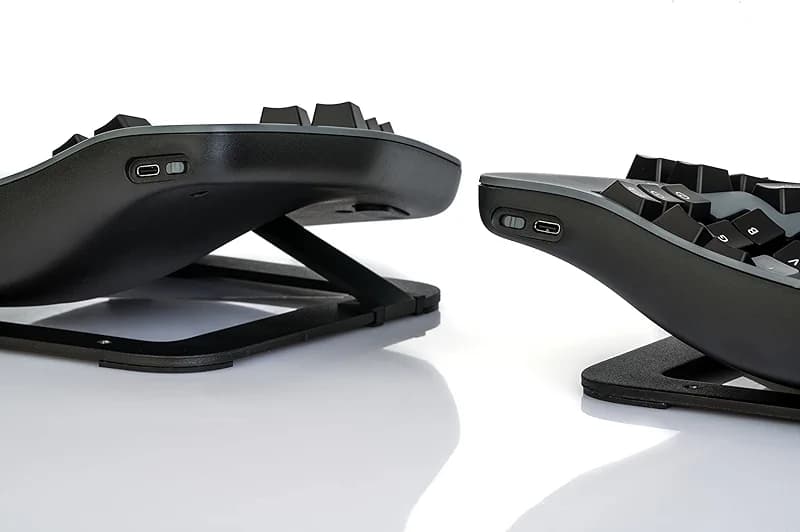
- Adjustable Tenting: The Kinesis KB820 model keyboard is pre-assembled with the popular VIP3 tenting accessory which enables 5, 10, or 15 degrees of tenting with integrated cushioned palm supports to keep forearms neutral and wrists supports for an optimal typing posture.
- Standard Windows Layout: The Freestyle2 for PC features a standard Windows layout with hotkeys like Cut, Copy, Paste, multimedia keys, and an embedded numeric 10-key to boost your productivity. No software or special drivers required.
- Low-Force Key Switches: The Freestyle2 uses a custom membrane key switch that features a low-activation force and tactile feedback to reduce finger fatigue, impact and strain.
- What'S In The Box: Freestyle2 keyboard with a standard Windows Layout and the VIP3 tenting accessory and palm supports pre-installed onto the keyboard for maximum convenience, adhesive cushioned palm pads, detachable pivot tether for adjustable splay, and Quick Start Guide.
The details
Specs at a glance
- Brand
- KINESIS
- Compatible Devices
- Windows 7, 8, 10, Linux
- Connectivity Technology
- USB
- Keyboard Description
- Ergonomic, Multimedia, Membrane
- Recommended Uses For Product
- Office
- Special Feature
- Ergonomic
- Color
- Black
- Keyboard backlighting color support
- Single Color
What buyers say
Top reviews
884 ratings on Amazon
- Verified
A great ergonomic keyboard
It took a little bit of time to get used to this layout, but this is a very good keyboard for those looking for ergonomic equipment. It takes a bit of time to get used to the design, but practice and regular use will make it easy to adjust. The keys feel great and my fingers h...
- Verified
An Outstanding Keyboard!!!
An outstanding keyboard!!! I recently broke my wrist but needed to continue working so went looking for a keyboard that would accommodate not being able to rotate, tilt or flex my left wrist. This keyboard was exactly what I was looking for!The construction is as good as the b...
- Verified
Very Good Overall
I have been using this keyboard 8+ hours per day, 5+ days per week, for almost 2 years now (I am a full time web developer). I originally bought this because 2 months into my job I was having intense wrist and finger pain, as well as hand cramping. After using this keyboard fo...
Same maker
More from KINESIS
More like this
Related picks
From the blog
Related reading
 Saturday Edit · 4 min read
Where to keep your money: Kinesis keyboards beat Aeron chairs
Most ergonomic roundups start with $1500 chairs like Aeron. This one starts with keyboards. Three Kinesis splits that fix typing posture Aeron lumbar can't touch.
Read the post Saturday Edit · 4 min read
Where to keep your money: the stand that beats most monitor arms
Most workstation guides assume a monitor arm is required for ergonomics. For the single-monitor desk that most of us actually use, the basic stand is often the better system choice.
Read the post